<?xml version="1.0" encoding="utf-8"?>
<feed xmlns="http://www.w3.org/2005/Atom">

  <title><![CDATA[AIDE - Android IDE technical blog]]></title>
  <link href="http://www.android-ide.com/blog/atom.xml" rel="self"/>
  <link href="http://www.android-ide.com/blog/"/>
  <updated>2014-10-16T16:23:32+02:00</updated>
  <id>http://www.android-ide.com/blog/</id>
  <author>
    <name><![CDATA[appfour GmbH]]></name>
    
  </author>
  <generator uri="http://octopress.org/">Octopress</generator>

  
  <entry>
    <title type="html"><![CDATA[AIDE for web development]]></title>
    <link href="http://www.android-ide.com/blog/2014/10/14/aide-for-web-development/"/>
    <updated>2014-10-14T16:16:19+02:00</updated>
    <id>http://www.android-ide.com/blog/2014/10/14/aide-for-web-development</id>
    <content type="html"><![CDATA[<p>Today we released a web development edition of AIDE on Google Play. It comes with full-blown Html, Css and JavaScript editor support &ndash;
including live error checking and code completion &ndash;, a quick way to preview your web pages even on other devices, and interactive courses for JavaScript and web development skills.﻿</p>

<!--more-->


<p><a href="https://play.google.com/store/apps/details?id=com.aide.web&referrer=utm_source%3Daidewebsite%26utm_campaign%3Dhomepage" target="_blank">
<img alt="Get it on Google Play"
 class="badge-img"
 src="https://developer.android.com/images/brand/en_generic_rgb_wo_60.png" />
</a></p>

<h2>Video</h2>

<div id="ytcontainer" class="main-video">
    <iframe id="ytiframe" height="100" width="160" class="main-video"
            src="http://www.youtube.com/embed/y5q6bPZIfoM" 
            frameborder="0" allowfullscreen></iframe>
</div>


<!--#include file="/templates/scripts.html"-->


<script>
    scaleYoutubeVideo("#ytcontainer", "#ytiframe");
</script>

]]></content>
  </entry>
  
  <entry>
    <title type="html"><![CDATA[Learning Game Development with AIDE]]></title>
    <link href="http://www.android-ide.com/blog/2014/04/08/learning-game-development-with-aide/"/>
    <updated>2014-04-08T15:01:31+02:00</updated>
    <id>http://www.android-ide.com/blog/2014/04/08/learning-game-development-with-aide</id>
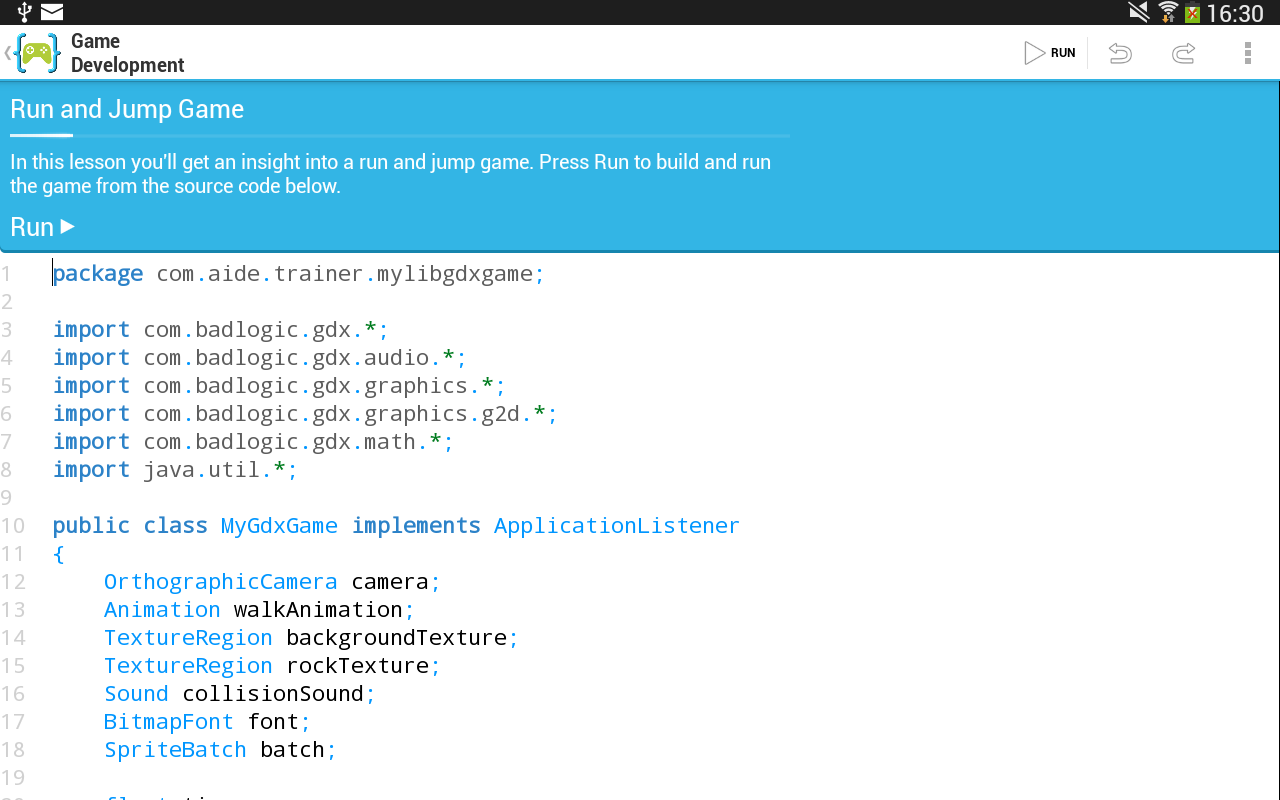
    <content type="html"><![CDATA[<p>AIDE v2.6 introduces a new interactive course for learning game development. It covers the basics,
scene setup, rendering game scenes with images and textures, movement, physics and user interaction.
We plan to add more lessons in the future.</p>

<!--more-->


<p>The library used is <a href="http://libgdx.badlogicgames.com/">libgdx</a>. A popular library used by many independant game developers.</p>

<p><a href="https://play.google.com/store/apps/details?id=com.aide.ui&referrer=utm_source%3Daidewebsite%26utm_campaign%3Dhomepage" target="_blank">
<img alt="Get it on Google Play"
 class="badge-img"
 src="https://developer.android.com/images/brand/en_generic_rgb_wo_60.png" />
</a></p>

<h2>Screenshots</h2>

<p>Game development course <br/>
<img src="http://www.android-ide.com/blog/images/jump-and-run-devel.png" title="Game development" alt="Game development"></p>

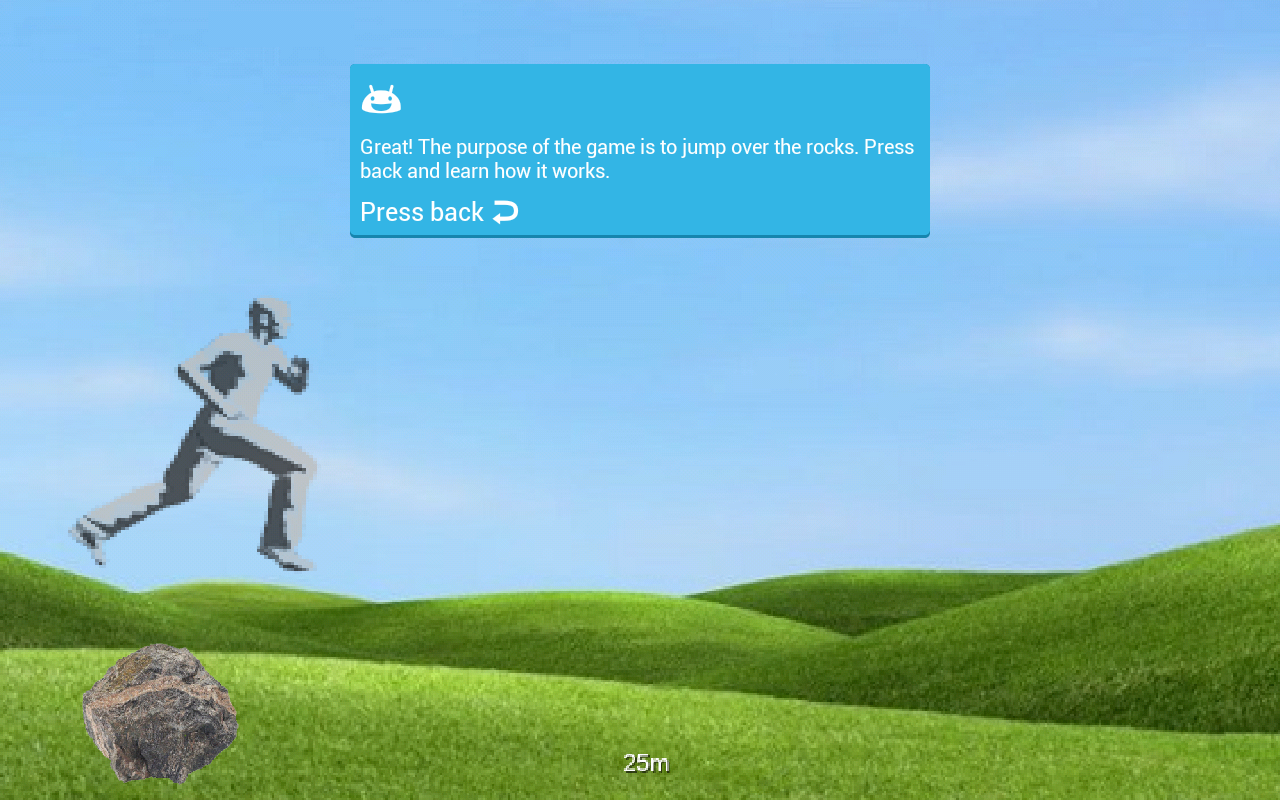
<p>Sample game <br/>
<img src="http://www.android-ide.com/blog/images/jump-and-run-game.png" title="Sample game" alt="Sample game"></p>
]]></content>
  </entry>
  
  <entry>
    <title type="html"><![CDATA[Learn how to develop Android apps with interactive lessons in AIDE]]></title>
    <link href="http://www.android-ide.com/blog/2014/03/04/learn-how-to-develop-real-android-apps-with-aide/"/>
    <updated>2014-03-04T17:48:20+01:00</updated>
    <id>http://www.android-ide.com/blog/2014/03/04/learn-how-to-develop-real-android-apps-with-aide</id>
    <content type="html"><![CDATA[<p>AIDE premieres interactive coding lessons directly integrated into the app.
There are two courses, one teaching basic Java skills, the other for Android-specific development.
It is possible to switch from the tutorial directly to the IDE to continue developing an app using
the sample code of the lesson as a base.</p>

<div id="ytcontainer" class="main-video">
    <iframe id="ytiframe" height="100" width="160" class="main-video"
            src="http://www.youtube.com/embed/zF7mW1XjjqQ" 
            frameborder="0" allowfullscreen></iframe>
</div>


<!--#include file="/templates/scripts.html"-->


<script>
    scaleYoutubeVideo("#ytcontainer", "#ytiframe");
</script>


<p>The interactive courses offer hours of material and we plan to continuously
extend them to cover more topics. Access to all interactive courses is included in
the AIDE Prime Subscription.</p>
]]></content>
  </entry>
  
  <entry>
    <title type="html"><![CDATA[Using Android's hidden sampling profiler]]></title>
    <link href="http://www.android-ide.com/blog/2014/01/26/using-androids-hidden-sampling-profiler/"/>
    <updated>2014-01-26T17:30:00+01:00</updated>
    <id>http://www.android-ide.com/blog/2014/01/26/using-androids-hidden-sampling-profiler</id>
    <content type="html"><![CDATA[<p>Profiling on Android is usually limited to the tracing profiler. In this blog post I will describe how
to use the hidden sampling profiler instead, which offers many advantages.</p>

<!--more-->


<h2>Profiling on Android</h2>

<p>When developing performance-sensitive apps on a mobile device profiling is one of the most important
techniques to figure out what code takes the most time. The standard way to do this on Android is to use
the <a href="http://developer.android.com/tools/debugging/debugging-tracing.html">built-in tracing profiler</a>.
But using the tracing profiler has some serious shortcomings. Most importantly turning on tracing means
measuring a totally different application, because tracing adds a serious overhead. The overhead
is caused by method instrumentation making method calls much more expensive. This issue is compounded
by the fact that tracing on Android turns off the JIT. Another problem is that the number of recorded
events is limited by the trace size. With the default trace size (8 MB) only a few
seconds of execution time can be recorded.</p>

<h2>The &lsquo;hidden&rsquo; sampling profiler</h2>

<p>Those issues could be overcome by using a sampling profiler which records the stack trace of the running
threads at a chosen sampling rate. Unfortunately sampling profiling is not officially supported on Android.
There has been some development lately in the AOSP Git repositories which suggest that this is about to
change, but nothing definite has been announced yet. Even if it becomes available it will most likely only
be supported on future Android versions.</p>

<p>Luckily there is a hidden sampling profiler in Android going back at least as far as Android 2.3. There are
some obstacles to using it though. It is not
supported by the Android development tools and it is an in-process profiler which cannot be triggered from
the Dalvik Debug Monitor Server (DDMS). Furthermore it is not included in the ADT android.jar files
thus preventing easy integration. Also the API is not stable and has in fact changed considerably from
Android version to Android version.</p>

<h2>Introducing: The Android Sampling Profiler Facade</h2>

<p>To make it easy to use the sampling profiler we have created an small library, the <a href="https://github.com/android-ide/android_sampling_profiler_facade">Android Sampling
Profiler Facade</a>. It is packaged as a JAR file.
To use just drop it into the <code>libs/</code> directory of your Android project.
If your project is an Android Studio project you also have to add the JAR dependency
to your <code>build.gradle</code> file:</p>

<figure class='code'><figcaption><span></span></figcaption><div class="highlight"><table><tr><td class="gutter"><pre class="line-numbers"><span class='line-number'>1</span>
<span class='line-number'>2</span>
<span class='line-number'>3</span>
</pre></td><td class='code'><pre><code class='c'><span class='line'><span class="n">dependencies</span> <span class="p">{</span>
</span><span class='line'>    <span class="n">compile</span> <span class="n">files</span><span class="p">(</span><span class="err">&#39;</span><span class="n">libs</span><span class="o">/</span><span class="n">sampling</span><span class="o">-</span><span class="n">profiler</span><span class="o">-</span><span class="n">facade</span><span class="p">.</span><span class="n">jar</span><span class="err">&#39;</span><span class="p">)</span>
</span><span class='line'><span class="p">}</span>
</span></code></pre></td></tr></table></div></figure>


<p>Since the Android sampling profiler is in-process you need to add some code to your app. The public API of
the facade is in the <code>com.appfour.samplingprofiler.SamplingProfilerfacade</code> class.</p>

<p>First initialize the profiler, e.g. in on the <code>onCreate()</code> method of an activity using the <code>init()</code> method.
The <code>init()</code> methods takes parameters which can not be changed for this profiling session:</p>

<ul>
<li><p><code>stackDepth</code> &ndash; specifies number of stackframes that are being captured during
profiling. With a higher number more of the callchain to hotspots will be visible when
analyzing the captured data later. But a higher stack depth also requires more
memory on the VM heap during profiling. A stack depth of ten is a good number
to start with.</p></li>
<li><p><code>intervalInMs</code> &ndash; specifies the interval between samples taken in milliseconds. The lower the
number the higher the resolution. But a lower number also means that the sampling profiler
requires more memory and affects the behavior of the program more. An interval of 10 ms
(equivalent to about 100 samples per second) is a good value to start with.</p></li>
<li><p>The third parameter specifies what threads are being sampled. There are several overloads for specifying all
threads, a fixed number of threads, or a dynamically computed ThreadSet.</p></li>
</ul>


<p>Sampling can be started and stopped using the <code>startSampling()</code> and <code>stopSampling()</code> methods. This way
only the interesting parts of the app are being profiled.</p>

<p>Once all interesting parts have been profiled the profiler can be shut down and profiling data can be
written out with the <code>writeHprofDataAndShutdown()</code> method.</p>

<p>The following example shows how to launch the profiler when the activity is started and how to stop taking samples
and write the profiling data once the activity is stopped.</p>

<figure class='code'><figcaption><span></span></figcaption><div class="highlight"><table><tr><td class="gutter"><pre class="line-numbers"><span class='line-number'>1</span>
<span class='line-number'>2</span>
<span class='line-number'>3</span>
<span class='line-number'>4</span>
<span class='line-number'>5</span>
<span class='line-number'>6</span>
<span class='line-number'>7</span>
<span class='line-number'>8</span>
<span class='line-number'>9</span>
<span class='line-number'>10</span>
<span class='line-number'>11</span>
<span class='line-number'>12</span>
<span class='line-number'>13</span>
<span class='line-number'>14</span>
<span class='line-number'>15</span>
<span class='line-number'>16</span>
<span class='line-number'>17</span>
<span class='line-number'>18</span>
<span class='line-number'>19</span>
<span class='line-number'>20</span>
<span class='line-number'>21</span>
<span class='line-number'>22</span>
<span class='line-number'>23</span>
</pre></td><td class='code'><pre><code class='java'><span class='line'><span class="nd">@Override</span>
</span><span class='line'><span class="kd">protected</span> <span class="kt">void</span> <span class="nf">onStart</span><span class="o">()</span> <span class="o">{</span>
</span><span class='line'>    <span class="kd">super</span><span class="o">.</span><span class="na">onStart</span><span class="o">();</span>
</span><span class='line'>    <span class="n">SamplingProfilerFacade</span><span class="o">.</span><span class="na">init</span><span class="o">(</span><span class="mi">10</span><span class="o">,</span> <span class="mi">10</span><span class="o">,</span> <span class="n">Thread</span><span class="o">.</span><span class="na">currentThread</span><span class="o">());</span>
</span><span class='line'>    <span class="n">SamplingProfilerFacade</span><span class="o">.</span><span class="na">startSampling</span><span class="o">();</span>
</span><span class='line'><span class="o">}</span>
</span><span class='line'>
</span><span class='line'><span class="nd">@Override</span>
</span><span class='line'><span class="kd">protected</span> <span class="kt">void</span> <span class="nf">onStop</span><span class="o">()</span> <span class="o">{</span>
</span><span class='line'>    <span class="kd">super</span><span class="o">.</span><span class="na">onStop</span><span class="o">();</span>
</span><span class='line'>    <span class="n">SamplingProfilerFacade</span><span class="o">.</span><span class="na">stopSampling</span><span class="o">();</span>
</span><span class='line'>    <span class="n">File</span> <span class="n">outFile</span> <span class="o">=</span> <span class="k">new</span> <span class="n">File</span><span class="o">(</span><span class="n">Environment</span><span class="o">.</span><span class="na">getExternalStorageDirectory</span><span class="o">(),</span> <span class="s">&quot;sampling.hprof&quot;</span><span class="o">);</span>
</span><span class='line'>    <span class="k">try</span> <span class="o">{</span>
</span><span class='line'>        <span class="n">FileOutputStream</span> <span class="n">outStream</span> <span class="o">=</span> <span class="k">new</span> <span class="n">FileOutputStream</span><span class="o">(</span><span class="n">outFile</span><span class="o">);</span>
</span><span class='line'>        <span class="k">try</span> <span class="o">{</span>
</span><span class='line'>            <span class="n">SamplingProfilerFacade</span><span class="o">.</span><span class="na">writeHprofDataAndShutdown</span><span class="o">(</span><span class="n">outStream</span><span class="o">);</span>
</span><span class='line'>        <span class="o">}</span> <span class="k">finally</span> <span class="o">{</span>
</span><span class='line'>            <span class="n">outStream</span><span class="o">.</span><span class="na">close</span><span class="o">();</span>
</span><span class='line'>        <span class="o">}</span>
</span><span class='line'>    <span class="o">}</span> <span class="k">catch</span> <span class="o">(</span><span class="n">IOException</span> <span class="n">e</span><span class="o">)</span> <span class="o">{</span>
</span><span class='line'>        <span class="n">Log</span><span class="o">.</span><span class="na">e</span><span class="o">(</span><span class="s">&quot;Sampling&quot;</span><span class="o">,</span> <span class="s">&quot;I/O exception writing sampling profiler data&quot;</span><span class="o">,</span> <span class="n">e</span><span class="o">);</span>
</span><span class='line'>    <span class="o">}</span>
</span><span class='line'><span class="o">}</span>
</span></code></pre></td></tr></table></div></figure>


<h2>Analyzing the profiling data</h2>

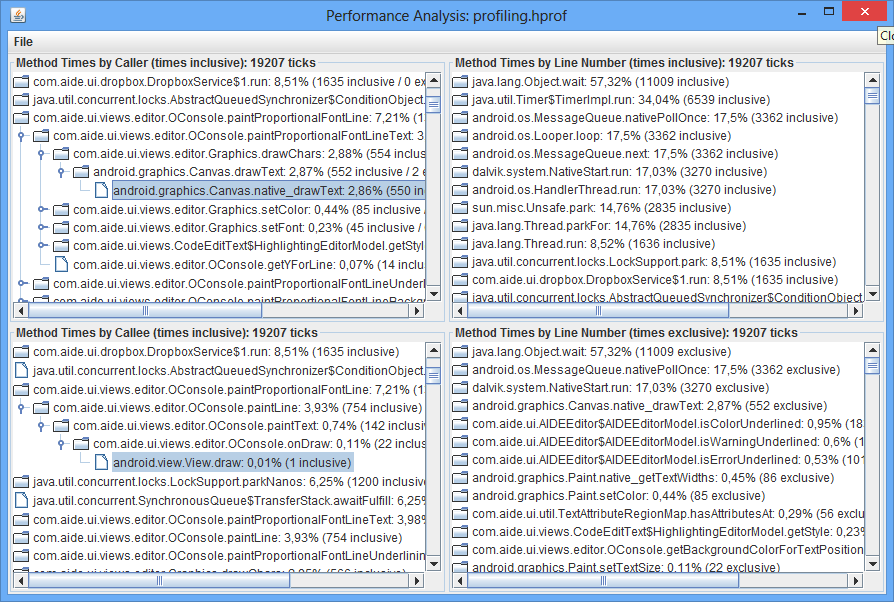
<p>The profiling data is written out in HPROF format. The only tool I have found which can analyze
those files is <a href="http://jperfanal.sourceforge.net/">JPerfAnal</a>. It looks a bit outdated and
does not have a lot of features but it works well enough for finding hotspots.
After copying the <code>.hprof</code> file onto your PC run JPerfAnal with <code>java -jar jperfanal.jar sampling.hprof</code>.</p>

<p>The line number information captured does not seem to be accurate so the &lsquo;Method times by Caller&rsquo; and
&lsquo;Method times by Callee&rsquo; sections are the most interesting.</p>

<p><img src="http://www.android-ide.com/blog/images/jperfanal.png" title="JPerfAnal" alt="JPerfAnal screenshot"></p>

<h2>Links</h2>

<ul>
<li><p><a href="https://github.com/android-ide/android_sampling_profiler_facade">Android Sampling Profiler Facade GitHub Project</a></p></li>
<li><p><a href="https://github.com/android-ide/android_sampling_profiler_facade/releases/download/v0.1.0/sampling-profiler-facade.jar">JAR file containing the ASPF</a></p></li>
<li><p><a href="http://jperfanal.sourceforge.net/">JPerfAnal for visualizing the captured data</a></p></li>
</ul>


<hr />

<p>Give it a spin and let us know if it works for you!</p>
]]></content>
  </entry>
  
  <entry>
    <title type="html"><![CDATA[Preview: Non-Android Java development in AIDE]]></title>
    <link href="http://www.android-ide.com/blog/2013/12/09/preview-non-android-java-development-in-aide/"/>
    <updated>2013-12-09T15:13:01+01:00</updated>
    <id>http://www.android-ide.com/blog/2013/12/09/preview-non-android-java-development-in-aide</id>
    <content type="html"><![CDATA[<p>We will add the much requested support for non-Android Java development to AIDE.﻿</p>

<div id="ytcontainer" class="main-video">
    <iframe id="ytiframe" height="100" width="160" class="main-video"
            src="http://www.youtube.com/embed/2XmxtIDWI_E" 
            frameborder="0" allowfullscreen></iframe>
</div>


<!--#include file="/templates/scripts.html"-->


<script>
    scaleYoutubeVideo("#ytcontainer", "#ytiframe");
</script>


]]></content>
  </entry>
  
  <entry>
    <title type="html"><![CDATA[AIDE 2.2 now available]]></title>
    <link href="http://www.android-ide.com/blog/2013/11/22/aide-2-dot-2-now-available/"/>
    <updated>2013-11-22T16:01:39+01:00</updated>
    <id>http://www.android-ide.com/blog/2013/11/22/aide-2-dot-2-now-available</id>
    <content type="html"><![CDATA[<p>AIDE 2.2 features many UI enhancements for faster coding including a context action bar for the editor, selection handles, quick keys and more.</p>

<!--more-->


<p><em>Full list of changes for v2.2.1:</em></p>

<ul>
<li>New: Quick key bar</li>
<li>Improved: Export APK has debugging and logging disabled</li>
<li>Fixed: Various build issues</li>
<li>Fixed: Various UI issues</li>
</ul>


<p><em>Changes already released as part of the 2.2.0 beta:</em></p>

<ul>
<li>New: UI overhaul following Android 4.x guidelines</li>
<li>New: Editor selection drag handles</li>
<li>New: Context action bar</li>
<li>New: Override method</li>
<li>New: Search textually in project</li>
<li>New: Support for Android 4.4 (KitKat) SDK</li>
<li>New: Support for Java 7 language features</li>
<li>New: Support for native development on x86 devices</li>
<li>New: Update existing project with newer Android Support Library</li>
<li>New: UI designer sizes increase/decrease</li>
<li>Improved: Numerous minor fixes and improvements</li>
<li>Improved: Updated Android Support Library</li>
<li>Improved: Editor performance</li>
<li>Fixed: Compiler issues</li>
</ul>

]]></content>
  </entry>
  
  <entry>
    <title type="html"><![CDATA[Session on AIDE at droidcon London 2013]]></title>
    <link href="http://www.android-ide.com/blog/2013/10/04/session-on-aide-at-droidcon-london-2013/"/>
    <updated>2013-10-04T16:53:39+02:00</updated>
    <id>http://www.android-ide.com/blog/2013/10/04/session-on-aide-at-droidcon-london-2013</id>
    <content type="html"><![CDATA[<p>We will show how developers can use AIDE to develop a fully functional Android app using only their
Android device. We will also show how AIDE makes it easy for developers to switch back and forth
between a PC dev environment (Android Studio or Eclipse) and AIDE for on-the-go development.
Finally, we will give technical insights about the making of AIDE, and show how we solved the
technical challenges to get a complete scalable Android toolchain working on Android itself.</p>
]]></content>
  </entry>
  
  <entry>
    <title type="html"><![CDATA[App UI Designer released]]></title>
    <link href="http://www.android-ide.com/blog/2013/09/20/app-ui-designer-released/"/>
    <updated>2013-09-20T16:37:10+02:00</updated>
    <id>http://www.android-ide.com/blog/2013/09/20/app-ui-designer-released</id>
    <content type="html"><![CDATA[<p>We have just released a companion tool to AIDE. It is a full featured UI Designer running directly
on Android devices.</p>

<p>This app can run standalone and is also fully integrated into AIDE if both are installed. It can import and export Android layout XML files,
which are used by the Android SDK to define user interface layouts.﻿</p>

<p><a href="https://play.google.com/store/apps/details?id=com.aide.designer&amp;referrer=utm_source%3Daidewebsite%26utm_campaign%3Dblog">Available now in the Google Play Store</a>.</p>
]]></content>
  </entry>
  
  <entry>
    <title type="html"><![CDATA[AIDE for PhoneGap/Cordova]]></title>
    <link href="http://www.android-ide.com/blog/2013/08/14/new-aide-for-phonegap-slash-cordova/"/>
    <updated>2013-08-14T16:53:12+02:00</updated>
    <id>http://www.android-ide.com/blog/2013/08/14/new-aide-for-phonegap-slash-cordova</id>
    <content type="html"><![CDATA[<h2>Develop cross-platform Apps with HTML5/CSS/JavaScript and PhoneGap/Cordova</h2>

<p>We have just released AIDE for PhoneGap, an edition of AIDE specificially designed for creating PhoneGap/Cordova apps.
AIDE for PhoneGap now gives developers of PhoneGap apps the same stunning level of
development comfort on-the-go that AIDE has offered for native Android development so far.</p>

<!--more-->


<p>PhoneGap is a free and open source framework that allows you to create mobile apps using standardized web
APIs for the platforms you care about.
You can use your exisiting HTML5/CSS/JavaScript web development skills to build apps which
can be quite easily transfered to various mobile platforms.
Learn more about PhoneGap at <a href="http://phonegap.com/">phonegap.com</a>.</p>

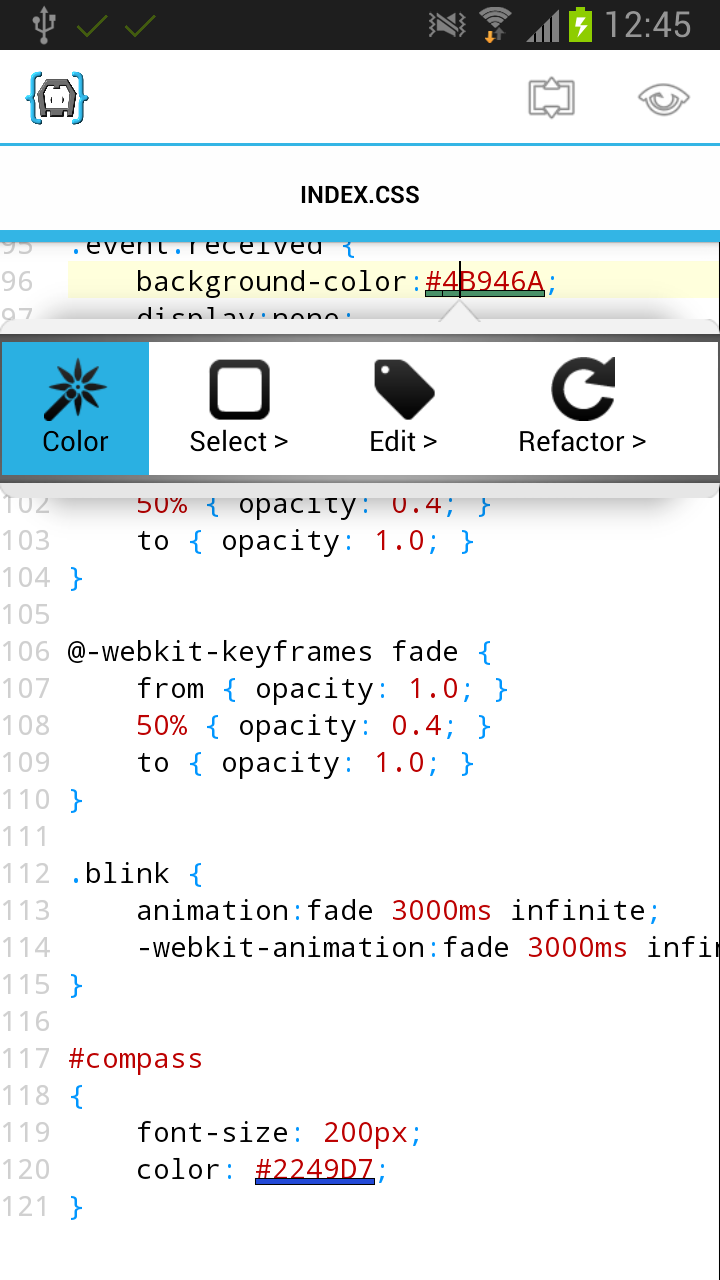
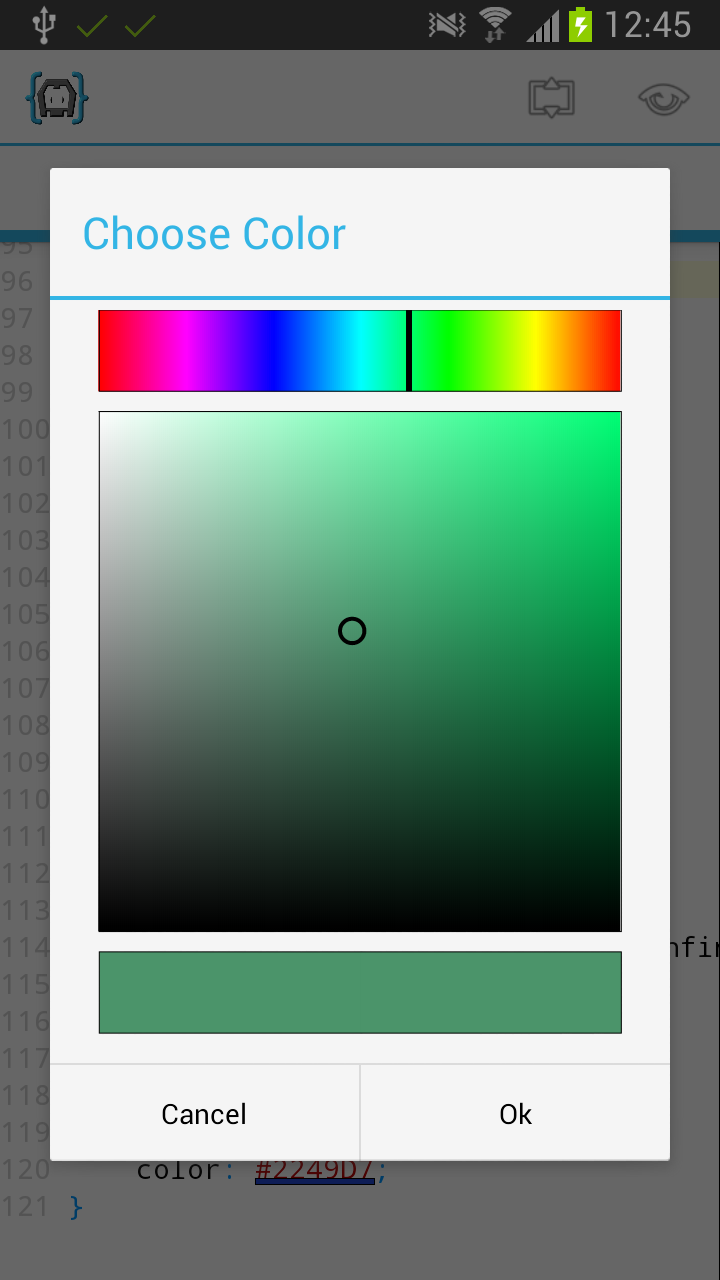
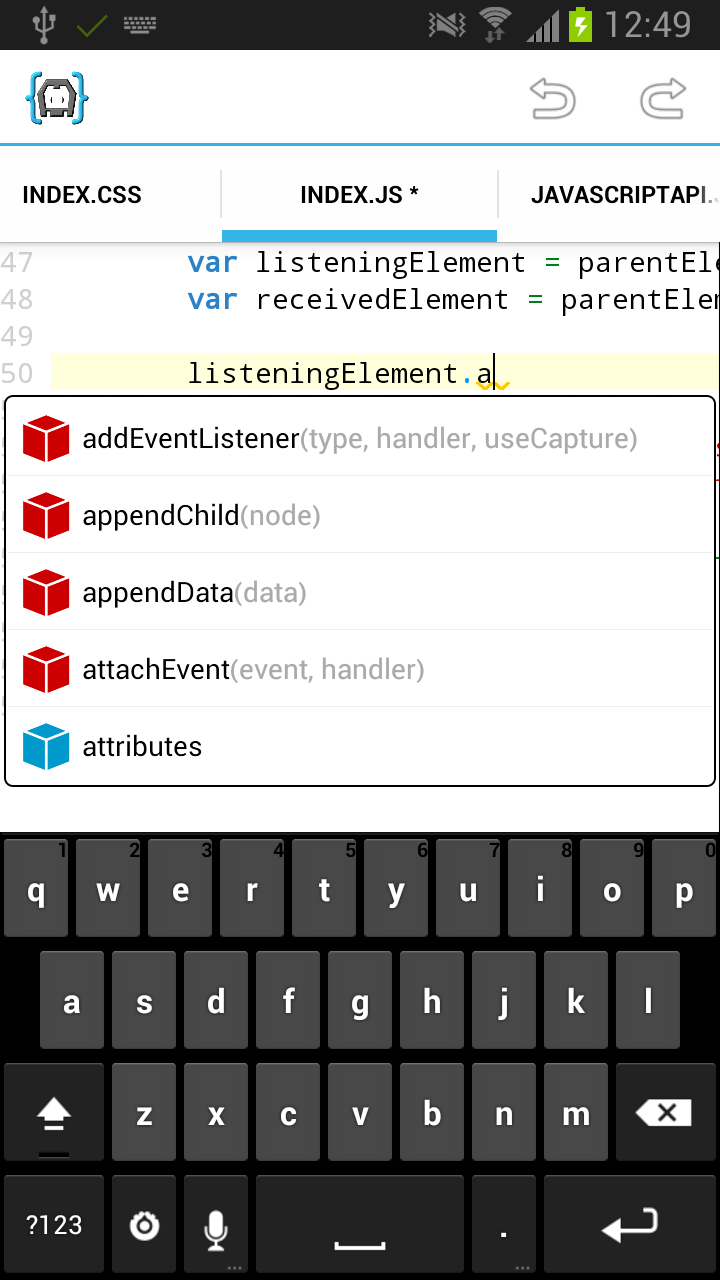
<p>AIDE for PhoneGap comes with rich editor support for HTML5, CSS and JavaScript: Syntax highlighting,
code completion, color picker, error checking, refactoring and code navigation features.</p>

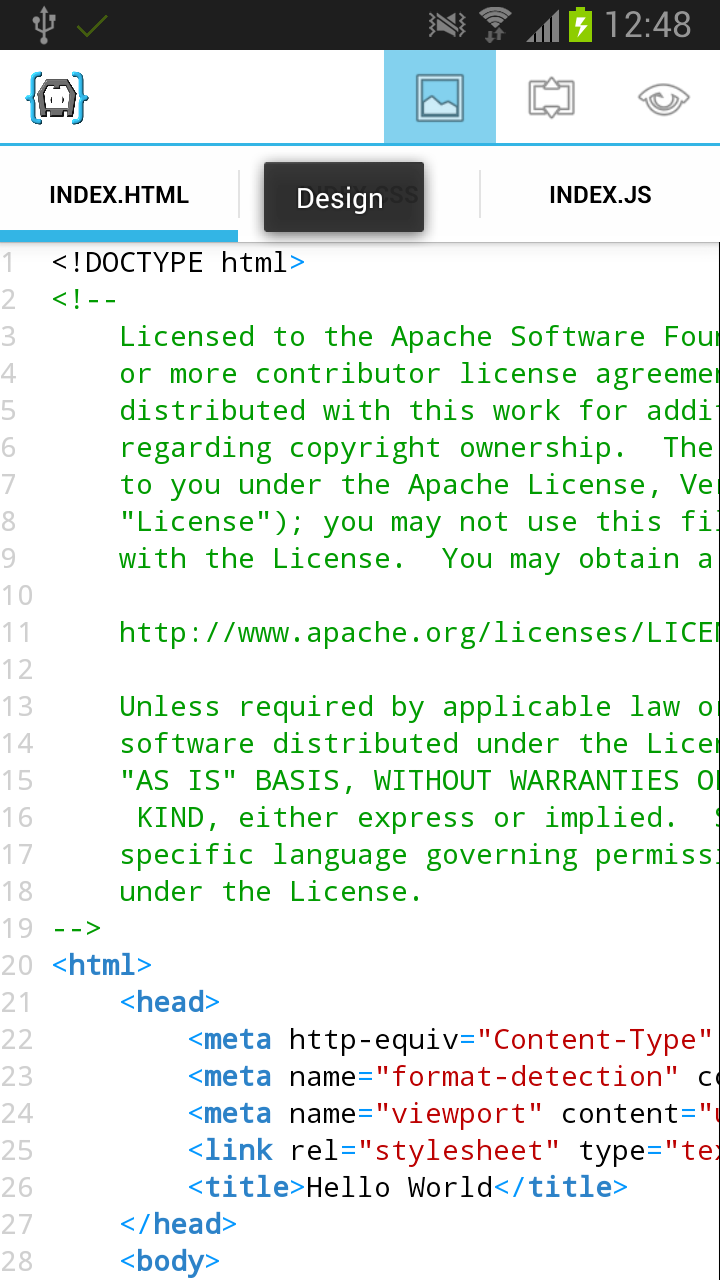
<p>AIDE for PhoneGap also comes with an integrated quick design preview for pages, which
results in an extremly fast turnaround time to see changes to your app. Of course
it is also possible to build a real APK for your PhoneGap app and run it directly
on the device, so that you can test your app under real conditions.</p>

<p>AIDE for PhoneGap supports popular mobile UI frameworks to speed up development, like jQuery Mobile.
Besides the full PhoneGap API you can also use custom PhoneGap plugins.
Finally, you can even develop your own (Android) plugins,
by utilizing the integrated Java support inherited from AIDE.</p>

<p>This is a regular paragraph.</p>

<p>This is another regular paragraph.For developers who have some web development
skills, but are not familiar with Java and the Android SDK,
AIDE for PhoneGap is an easy way to get into app development.
There is no need to install a separate SDK. Just get AIDE for PhoneGap from Google Play
and <a href="http://www.android-ide.com/blog/../tutorial_phonegap.html">get started with PhoneGap app development today</a>.</p>

<div class="row">
    <div class="col-sm-4">
        <img class="img-responsive" src="http://www.android-ide.com/blog/../img_phonegapnews/csscolor.png" />
    </div>
    <div class="col-sm-4">
        <img class="img-responsive" src="http://www.android-ide.com/blog/../img_phonegapnews/csschoosecolor.png" />
    </div>
    <div class="col-sm-4">
        <img class="img-responsive" src="http://www.android-ide.com/blog/../img_phonegapnews/jscompletion2.png" />
    </div>
</div>


<br />


<div class="row">
    <div class="col-sm-4">
        <img class="img-responsive" src="http://www.android-ide.com/blog/../img_phonegapnews/startdesign.png" />
    </div>
</div>


]]></content>
  </entry>
  
</feed>